AutoScanTrade user guide
What every window, button and setting in AutoScanTrade does, and how to use it. AutoScanTrade is a trading desk for Windows: a live scanner for fast-moving stocks, a manual trading panel with hotkeys, automated entries on your own rules, software-managed exits, and a journal of every trade.
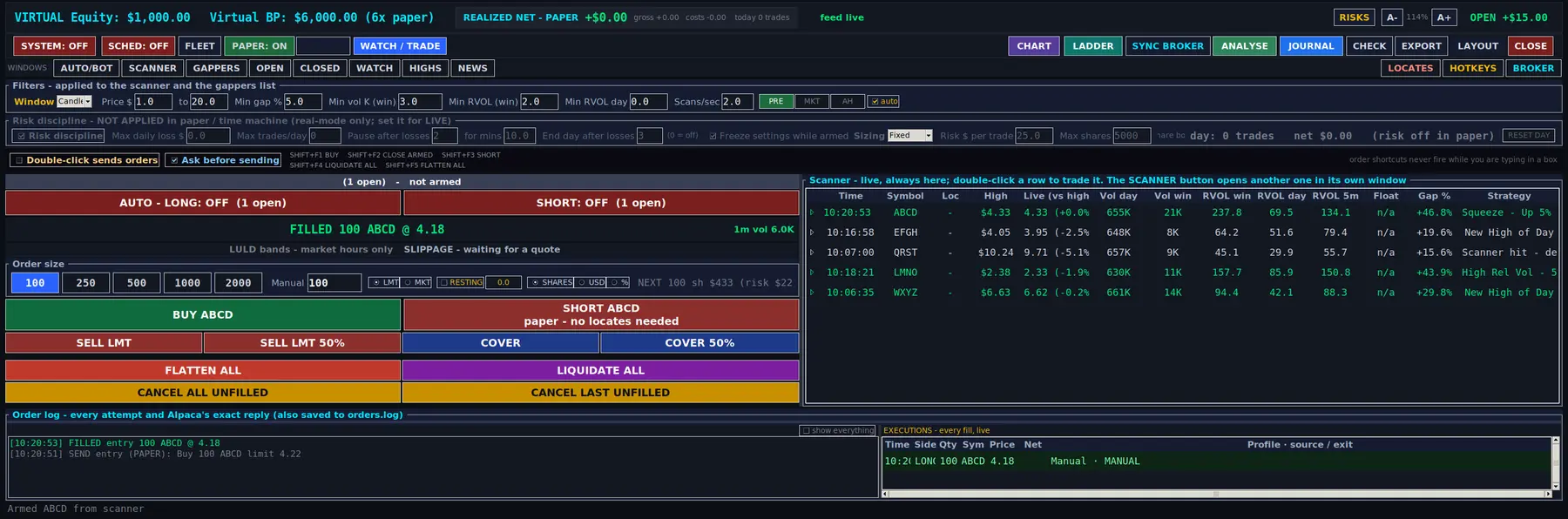
How the desk fits together
- The scanner finds movers. It watches the live market data from your own data subscription and lists stocks that pass your filters: price, gap, volume and relative volume.
- You arm a symbol. Click a scanner row or type a ticker. The trading panel, the trade ladder and the chart follow that symbol.
- You trade it, or the desk does. Press BUY or SHORT (or a hotkey) yourself, or arm the automation so the desk enters when your entry rules match.
- Exits are managed on every price. Take profit, stop loss, trailing stops and the other exits run inside the software for every open position, manual or automatic.
- Everything is recorded. Each closed trade goes into the journal with its costs, so you can review days, sessions and profiles later.
Take profit, stop loss, trailing stops and the other exits live in the program on your computer. They are not resting stop orders at your broker. Nothing protects a position while the program is closed, the computer is asleep, the network is down or the market data stops arriving. Read more.
Guide contents
Everything in this guide applies apart from the automation: AUTO/BOT, arming a side, the fleet, the schedule and the day target, and the journal and ANALYSE windows that read them back. The scanner, the trading panel, the exits, the ladder and the chart are the same, because it is the same program. What Lite is, on one page.
Words used in this guide
| Term | Meaning |
|---|---|
| Armed symbol | The stock the trading panel, ladder and chart are following. You arm one by clicking a row or typing a ticker. |
| Arming (automation) | Turning on an automatic entry engine. Nothing enters by itself until you arm it. |
| Paper / Live | Paper fills orders inside the software against the live prices, with a virtual wallet. Live sends orders to your broker with real money. |
| Session | Premarket (04:00-09:30 New York time), market hours (09:30-16:00) and after hours (16:00-20:00). |
| RVOL | Relative volume: how much a stock is trading compared with its normal pace. |
| Profile | A saved set of automation and exit settings that you can load, change and compare. |
| Locate | Shares your broker has found for you to borrow before you short a hard-to-borrow stock. |