Broker, keys and settings
Choose your broker, keep its commission schedule, enter your API keys, and set up sounds, layouts and the other desk-wide options.
BROKER window
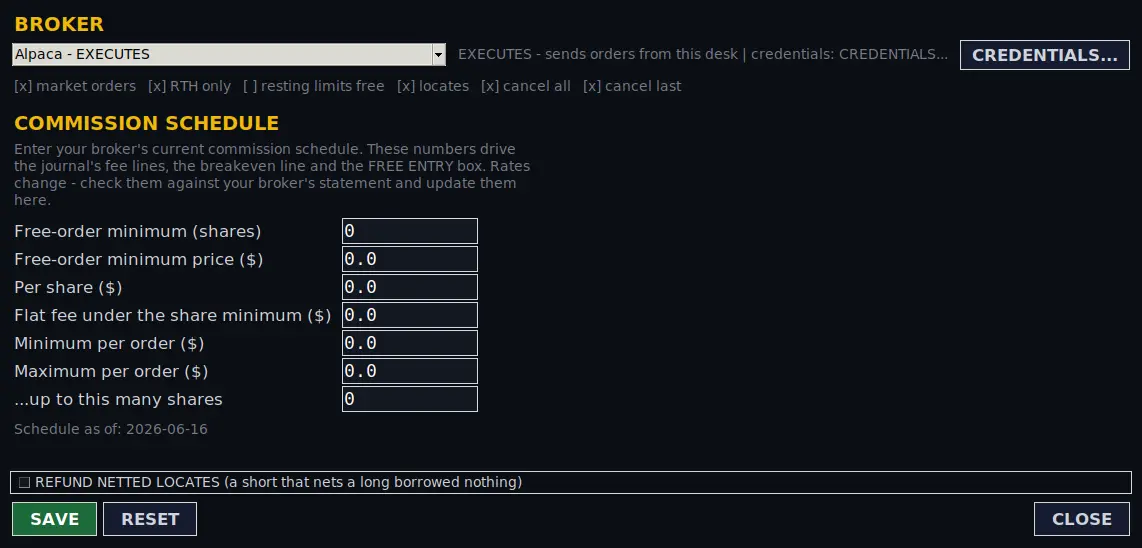
BROKER, at the right end of the WINDOWS row, sets which broker the desk sends orders to, what that broker can do, and its commission schedule.
| Part | What it means |
|---|---|
| Broker dropdown | Each broker shows its status. EXECUTES: the desk sends orders to it (TradeZero and Alpaca in this build). NEXT BUILD, REGISTERED and NO PUBLIC API: on file for their details, but no orders can be sent. Only a broker marked EXECUTES can be armed or traded live. |
| Capability line | Whether the selected broker takes market orders, only in regular hours, whether resting limits are free, whether it needs locates, and whether it supports cancel all and cancel last. |
| CREDENTIALS... | Opens the credentials window. |
| REFUND NETTED LOCATES | Whether a short that only closes out a long position gives its locates back to the desk's locate count. Off is the cautious choice: the count may run low and refuse a later short, rather than sending a short the broker would reject. Either way it is logged. |
| SAVE / RESET / CLOSE | Save the broker choice and schedule; put the shipped default schedule back in the boxes (nothing is written until you save); close without saving. |
Commission schedule
No broker supplies its commission schedule through its API, so you enter it and keep it current. These numbers drive the journal's fee lines, the breakeven and the free-entry figure. Check them against your broker's statement when anything changes.
| Field | Meaning |
|---|---|
| Free-order minimum (shares) | Orders of at least this many shares can qualify for free commission. |
| Free-order minimum price ($) | The share price an order must be at or above to qualify. |
| Per share ($) | Commission per share. |
| Flat fee under the share minimum ($) | A flat charge for orders below the share minimum. |
| Minimum / Maximum per order ($) | The lowest and highest commission on one order. |
| ...up to this many shares | The share count the maximum applies up to. |
Credentials
Open with CREDENTIALS... in the BROKER window.
| Part | What it does |
|---|---|
| DATA - Alpaca | Your Alpaca API key and secret for market data, and the feed (sip or iex). This key feeds the scanner, the lists, the news and the chart. TEST DATA asks Alpaca whether that feed answers with this key, and whether it is a paper or a live key. |
| EXECUTION | The broker that sends orders and the fields it needs, with its status and sign-in type. For Alpaca: a trading key, secret and whether it is a paper account (paper and live Alpaca keys are different pairs). The trading key is kept separate from the data key. TEST BROKER asks the broker whether the account is reachable. |
| show | Shows or hides a secret. |
| SAVE | Writes the values to the settings file on your PC (a backup of the old file is kept). New keys are used from the next start; the broker choice applies at once. |
| RESET / CLOSE | Put the saved values back in the boxes; close without saving. |
API keys are stored in a settings file beside the program on your own computer and are used only to talk to your data provider and your broker. Testing a key never saves it.
Paper, live and your code
The desk opens in paper. Switching to live needs no open positions, the fleet stopped, and your 6-digit code (created the first time, stored as a salted hash). Turning SYSTEM on in live and starting a live fleet slot also ask for the code. Full details are in getting started.
Sounds
Sound in the AUTO/BOT window sets the main alert voice and volume (up to 150%), and SOUNDS... opens the per-event window. In Lite, which has no AUTO/BOT window, a SOUNDS button on the WINDOWS row opens the same controls.
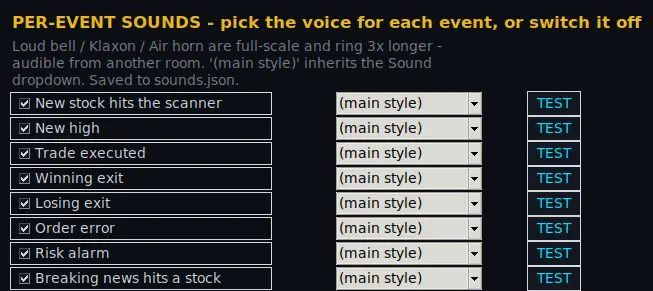
- Events: new stock hits the scanner, new high, trade executed, winning exit, losing exit, order error, risk alarm, breaking news hits a stock, a BUY signal on a chart, a SELL signal on a chart, and a chart turning against a stock you hold.
- Voices: Loud bell, Klaxon and Air horn (full-scale, longer and audible from another room), Classic beeps, Soft chime, Arcade blip, Double ping, Deep tone, Rising chime, Falling chime, Doorbell, Cash register, Siren, Laser, Sonar, Triple beep, Marimba and Fanfare. Voice uses Windows' own speech to say the event and the stock; where there is no speech engine it plays a tone instead.
(main style)follows the main Sound setting. - Tick or untick an event to switch it on or off, and press TEST to hear it.
Layouts and text size
- A- / A+: smaller or larger text everywhere on the desk.
- LAYOUT saves where windows and panes sit (not what they are set to):
- Save current as... and Save current + use at startup; saved layouts can be loaded, set as the startup layout or deleted.
- REPAIR LAYOUT: fixes squeezed panes and keeps your pop-out windows.
- FACTORY LAYOUT: docks everything back with the original proportions.
- ONE SCREEN: docks everything into the main window; Start up in ONE SCREEN makes that the startup layout.
- AUTO RESIZE: fits your layout to the screen you are on now.
CHECK, EXPORT and CLOSE
- CHECK runs the desk's self-check and lists each check as OK or with the reason it failed: the settings map and its bounds, whether the journal can be written, the locate ledger, the risk governor's day, the data feed thread, that paper and replay are not both on, the error log, and your hotkeys (two actions on one key combination is a failure). It only reports; it changes nothing.
- EXPORT writes a zip of the day's logs, journals and settings beside the program. Nothing is uploaded.
- CLOSE closes the program. Open positions are not closed and nothing protects them while the desk is not running. Flatten first if you want to be flat.
Risks and disclaimers
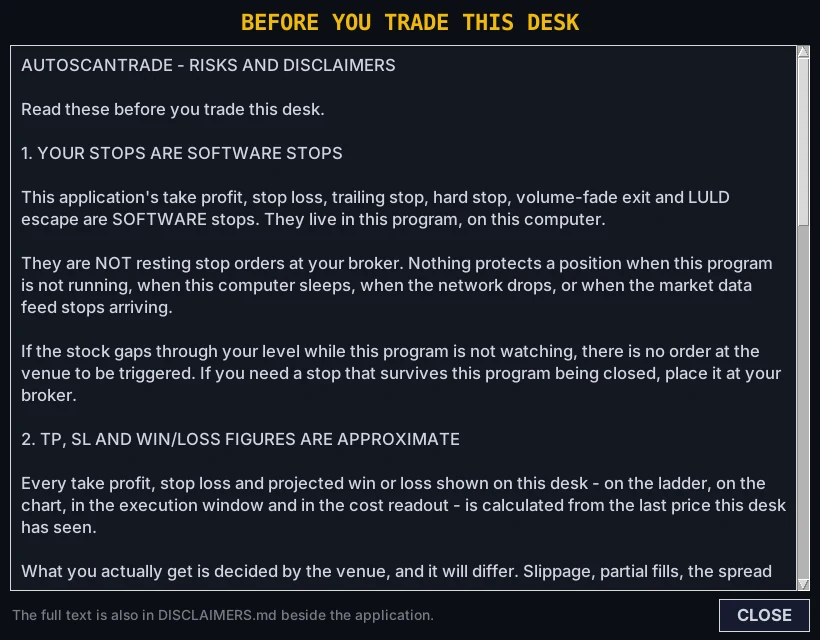
RISKS in the header opens the risks and disclaimers any time; the same text is in a file beside the program, and you accept it before the desk first opens. It covers, among other things:
- your stops are software stops (details);
- take profit, stop loss and profit or loss figures are estimates from the last price seen, and real fills differ;
- use the desk alongside your broker's own platform, which remains the record of what you hold;
- your computer's clock and time zone, and US market hours;
- the chart library is provided by an outside source;
- there is no circuit breaker: if the desk freezes, crashes or is closed while you hold a position, no second program will flatten it.
Clock and market time
Times on screen (log, journal, ladder, chart) are your computer's local time; market sessions follow New York time. The US and many other countries change clocks on different dates, so for a few weeks a year the local time of the US open moves. If your computer's clock or time zone is wrong, everything worked out from it is wrong too. The trading day is anchored to New York, so an after-hours session that runs past your local midnight stays in one trading day.